Wednesday, February 8, 2017

Everything you need to know about Pokemon Go Valentine Day event.

Finally, we get the official news from Niantic about the much awaited Valentine Day special event.
Here is the official statement.
With Valentine's Day just around the corner, we couldn't think of a sweeter time to double the amount of Candy you'll earn every time you catch, hatch, and transfer Pokémon. Your Buddy Pokémon is also getting into the Valentine's Day spirit and will find Candy twice as fast!Throughout the celebration, you'll notice that Chansey, Clefable, and many other adorable pink Pokémon will be encountered more frequently in the wild. Cleffa, Igglybuff, and Smoochum will also be more likely to hatch from Eggs. And to help you paint your town pink this Valentine's Day, Lure Modules will last for six hours for the entire duration of the event. 
So it is a week long event just like the previous events.

  • It starts on February 8th, 2017 at 11 a.m. PT / 2 p.m. ET.
  • It ends on February 9th, 2017 at 11 a.m. PT / 2 p.m. ET.
So in this period trainer's will see increased spawns of PINK Pokemons, increased lure times (6 hours to be specific!), double candies and buddy Pokemon gets candy faster too just like the Halloween Event.
So here some PINK Pokemons in the game right now.
  • Niantic's Official statement say Chansey and Clefable.
                                      

  • Other Pokemons are Clefairy, Jigglypuff, Wigglytuff, Slowpoke, Slowbro, Lickitung, Mr. Mime (EU).
Trainers will also be able hatch following Gen 2 baby Pokemons at increased rate.
  • Cleffa
  • Igglybuff
  • Smoochum
Lures instead of 30 minutes will last up to 6 hours to paint your city PINK.

Remember there was a poll on Niantic twitter account for which event was the most liked and Halloween got the most votes so, finally Niantic is bringing the most loved double candy feature to this event too. Let us break it down.
  • Catch a Pokémon in the wild: 6 candies.
  • Hatch a Pokémon Egg:
  • 2KM: 10 to 30 candies.
  • 5KM: 20 to 42 candies. -10KM: 32 to 64 candies.
  • Trade a Pokémon to Professor: 2 candies.
You'll also get candy twice as fast for walking a Buddy Pokémon, so:
  • 1 km Buddies will award candy every 0.5 km.
  • 3 km Buddies will award candy every 1.5 km.
  • 5 km Buddies will award candy every 2.5 km.
So that sums up all the available information on this new event. Get out there and catch those monsters.
Happy Catching !


Thursday, January 26, 2017

Everything you need to know about Catch Bonus in Pokemon Go


Hey everyone, I am back with something for all the Pokemon players out there. Pokemon Go game has got a revolution in the gaming industry but how much ever popular the game is Niantic is always busy hiding stuff from its users and leaves everyone to research online and figure they way out. I have been playing this game since the launch day and so far it has been a decent experience.
Since the day I started playing I am following this amazing Pokemon Trainer who also Beta tested the game for Niantic, Nick. He uploads a new training video everyday and covers a lot of new stuff one can learn.
So, I decided to explore the catch bonus in the game and with my research on many online websites and Nick's video about catch mechanics which I have linked below.
The new medals which you get for a certain type of Pokemon act as a multiplier to the base catch rate. Bronze is +1, Silver is +2 and Gold is for +3.
The type of ball you use and the type of throw also effects the catch rate of the pokemon.
Let us see an example to make things clear:

Suppose, Base catch rate of a pokemon is 10% and we have a gold medal bonus for that pokemon which gives ou +3%.  For a great throw the multiplier is 1.5x, if you also through a curve ball which I strongly suggest to all the time, you get an extra multiplier of 1.25x, the use of Ultra Ball will earn you 1.5x multiplier and razz berry gives another 1.25x.
So, for this pokemon the catch rate with these parameters is (10%+3%)*1.5*1.25*1.25*1.5 = 45.7%.


Hope the video and formula above helped you guys learn more about the catch bonuses and how to use them effectively.

Source  Subscribe TrainerTips

Sunday, January 22, 2017

Just In: Blasting Note7 Explained!

Samsung is trying to win back their customers' trust as they just posted a video on their official youtube channel, explaining the technical flaws in the battery of Note7 which made it to catch FIRE. Find the official video here.


Committed to Quality is what the title is on the video and the way they made this video is truly impressive. The video sites BATTERY as the main issue of the fire incidents of the Note7. It gives a lot of technical details as how the quality assurance lacked few tests and how they learned from this and are improving their testing process. For all the technical details head over the video and learn more about, but cutting it short the batteries of both the original Note7 and the replacement units had manufacturing defects which did not get detected during testing. The video says that Samsung has learnt a lot from this is always committed to innovate for giving the customers best experience without the cost of quality, but only time will tell that will Samsung be able to win the trust of the customers again. It is a long, tough road for Samsung this year to win the trust back and all we can do is to wish them luck.


Friday, January 20, 2017

T-Mobile Tuesday deals are back and this week a lot of them.

By now, almost all of us know about T-Mobile Tuesday, the reward program that T-Mobile has for it's customers. This is one of a kind and has a lot of great rewards every week like free Lyft rides, free movie tickets, free magazine subscription, discount at Shell gas stations and lot more. They are bang on target with their rewards every week with a very impressive portfolio every Tuesday. The magenta carrier has released the list of rewards for the coming Tuesday, and they have a lot of them this time. You are getting discounts at Shell gas station for you as well as you can gift it to 1 friend of yours. They have also got you covered if you don't own a car, go ahead and take the $15 Lyft ride. Are you a movie buff, yes you and your friend are covered too, head to FandangoNOW and rent any movie for free up to $5.
Here is the complete list for this Tuesday's loot.


So here are all of them, quite a lot right ? From free stuff to lucky draws they have it all. So head over to app stores on your devices and download the T-Mobile Tuesday app for Android and iOS. If you use a phone with none of these OS, don't worry head over the website. All the links are at the end.

Website Apple App Store Google Play Store


Monday, January 16, 2017

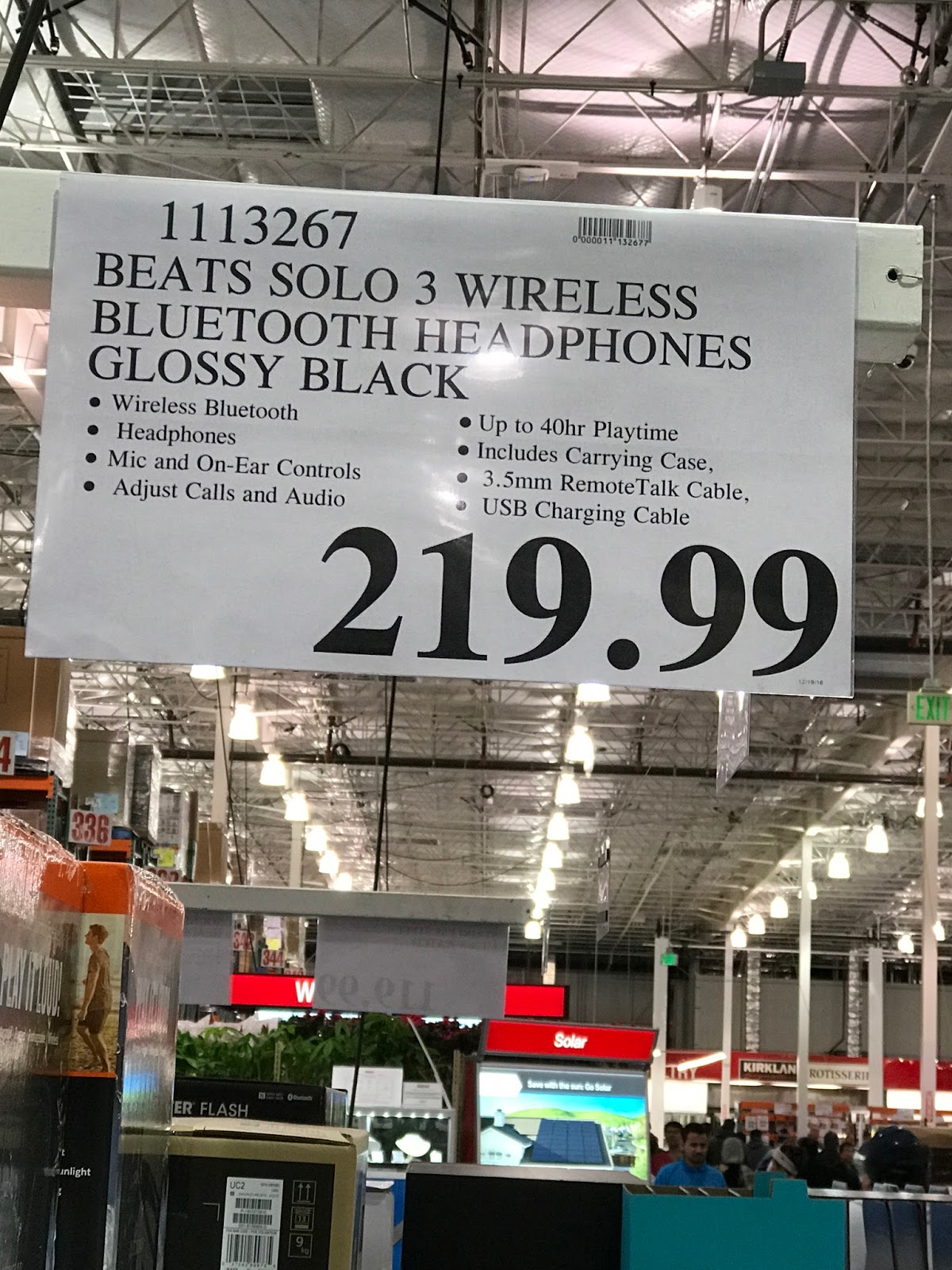
Deal Alert: Get Beats Solo3 Wireless for $219.99.

My yesterday's visit to Costco. got my eyes on an amazing deal for all the bass music fans out there. If you are into wireless music and prefer some bass then you need to look no more and go for Beats Solo3 Wireless.


These amazing pair of headsets retail for about $299.95 from the official Apple but if you are a Costco member then you are in luck and could easily save 80$ on the headsets.


This is a steal for 40 hours of battery life, superior bass and great sound quality. Also if you own an iPhone then the W1 chip in these makes them the easiest headphones to pair with you device and lets you take full advantage of the headsets.
If you are looking for a specific color then this deal won't be worth looking for you as the only color you can get is Glossy Black. So head over to the link below and order it online or head to the nearest Costco store to grab one if this seems to be the deal you were waiting for (Members only).

Costco


Sunday, December 18, 2016

Get free iTunes, Google Play, Amazon, Xbox, Windows Store etc gift cards..!!

Today, I want to show you guys this amazing and authentic website that gives you real points which you can change for various gift cards like iTunes, Amazon, Google Play etc.
I have tried many such websites and to be honest I hated each of those because they never awarded points for the surveys taken and stuff done. But I came across FreeMyApps which gave me points not only to download and try apps for 30 seconds but also for referring my friends.
Follow this simple tutorial and you can also earn points and redeem loads of gift cards of your choice
  1. Just open this link on your mobile devices.


  2. Then click on Get Started and follow the on screen commands.
  3. After that you will be redirected to a website where you will see many different apps to try and point value of each of them.
  4. Download the app of your choice and use it for 30 seconds.
  5. Go back to the web page and refresh it to see your points credited in your account.
That is it. Now earn as much points as you want and redeem for cool stuff. Follow the youtube video below for the video tutorial.


Happy Earning..!!

Thursday, October 27, 2016

Xiaomi Mi Mix: Welcome to the future of smartphone.

Big smartphone players like Apple, Google etc are being criticized for not cutting on bezels of the phone and making phones with low screen-to-body ratio, Xiaomi, a big player in Chinese smartphone market unveiled a nearly border-less display phone which they like to call as concept phone, but will actually go on sale.

The main attraction of the phone is pretty insane 6.4-inch, 2040x1080 pixel, 17:9 aspect ratio display developed by sharp. Xiaomi claims the device to have 91.3% screen to body ration which is more than any smartphone out there in the market. This is truly a Xiaomi original phone. It looks stunning and has a ceramic back for the premium feel.
The phone specs are amazing too. It is powered by the new Snapdragon 821 chip and has 2 RAM variants: One with 128 gb storage and 4 gb ram and other with 256 gb storage and 6 gb ram. The 256 gb also gets some design upgrades with 18k-gold trims at rear for camera and fingerprint sensor.
The phone has 16 megapixels main-shooter with PDAF and 4k-video recording and the secondary shooter is 5 megapixels which is at the bottom of the phone on the thin and only bezel of the phone. It supports dual-sim and has a 4000 mah battery with Qualcomm Quick-Charge 3.0 technology for fast charging.
The Mi MIX starts at RMB 3,499 ($515) for the 4GB/128GB model and RMB 3,999 ($590) for the 6GB/256GB model. Having ceramic back the phone becomes a bit slippery so Xiaomi has taken a very good step to include premium leather case in the box of both models.
Xiaomi is making the competition stiff for big players which such innovations, Lets see what the future holds for the smartphone industry.

Source

Tuesday, July 5, 2016

Install iOS 10 Developer Beta without Apple Developer Account

Apple released their most advanced mobile OS till date, iOS 10 at the WWDC 2016 this year and announced about the developer preview available from the very same day.
People with developer accounts can head to the Apple developer website and download the beta using Xcode 8 on their MACs and use it in their phone. Public beta was announced to release some time in July.
But the developer profile which needs to be loaded on phone is already available on the web and can be installed on any iOS device compatible with iOS 10 and the update can be downloaded OTA directly on the phone.
Though you get all the new features and can enjoy using it, the OS update is very buggy and simple apps like Facebook crash on this preview.
People have also reported automatic restarts of phone and phone lagging so in simpler words uf you can compromise on your device performance for new features you can go ahead and follow these steps and install iOS 10. Make sure you are viewing this on your iDevice as you have to install the developer profile directly on your device.
  1. Delete any previous profiles you have installed by going in Settings > General > Profile.
  2.  Download iOS 10 developer beta profile from the link by opening it on your iDevice and when prompted install it. After you install it successfully you will be prompted to re-start your device.
  3. Go ahead and re-start your iDevice and check for updates by going in Settings > General > Software Updates. The update is 1.53 gigabytes in size.
  4. You will see iOS 10 Developer Beta 1/2 available. When you see that you can click on download and install on the end and wait for the update to get downloaded.
That is it. After these steps you will successfully be able to use iOS 10 developer beta. It is very buggy and crashes a lot so be very sure before doing it.
Going back to iOS 9.3.3 is fairly easy and many tutorials are available on the web for it so if in future you want to go back there is way.
This is it for now folks. Hit back in comments and share your experiences with the new update and major bugs that you face.

Apple releases iOS 10 beta 2 fro developers to squash major bugs in beta 1.

Apple has released Beta 2 for their by far biggest mobile OS release the iOS 10.


The beta 1 for iOS 10 was very buggy as it was targeted only for developers for testing on their development devices.
Many bloggers predicted that Apple might release their Beta 2 on 4th July 2016, based on previous update patterns. Probably due to that being a holiday in US, they finally released the update today.
Here is the complete release notes for the update.
For more information about the update you can redirect to the source I used to read about the update.
For steps on how to install iOS 10 Developer Beta without developer account follow this link.
That is it for now. Hit up in the comments section for your experiences with the OS and other thoughts.

Tuesday, October 22, 2013

Hola !!!! Next generation Nokia Devices...

Truly the Nokia World 2013 reinvented innovation today in the morning.

What we saw today ??

3 new Asha Devices
2 new Lumias
Nokia's First Tab.

The newly launched Nokia Asha 501 got its siblings today which extended the Asha touch family to 4 devices. The newly launched Asha devices are 500, 502 and 503 (3G capable).
The Asha series also got some great news today with Whatsapp being announced for them and a lot of new features which are to be given to 501 by a firmware update later this year(November i guess).

The new features include :

  1. Swipe for camera and Tap to share.
  2. Whatsapp for the Asha series.
  3. 3G comes to Asha 503.
  4. New Camera App.
  5. Personalization of fast lane now possible.
We also saw 2 new Lumias today, beautiful 6- inchers. Nokia Lumia 1520 and Nokia Lumia 1320.
Lumia 1520 is a high end phablet which will give tough time to players already present in the market while 1320 being a budget friendly phablet. Nokia also announced Refocus app for PureView series of lumias and added RAW file support. The next firmware update by Nokia named Lumia Black coming kater this year for the previous devices which will include the Microsoft Update 3 like the Amber update had GDR2 pre-baked in it.

Quick specs of Lumia 1520 are :
  1. 1080p FHD screen with Gorilla Glass 2 for protection.
  2. Qualcomm Snapdragon 800 clocked at 2.2 ghz quad core Krait 400.
  3. 32 gb internal storage expandable upto 64 gb.
  4. A 20 mpx Pureview shooter on the back and 1.2 mp cam on the front for self portraits.


Quick specs of Lumia 1320 are :
  1. 6 inch beautiful display with Gorilla Glass 3.
  2. Qualcomm Snapdragon 800 dual core processor with 1 gb ram.
  3. Internal storage 8 gb, expandable via microSD card upto 64 gb.
  4. 5 mpx back shooter and VGA front cam for video calls.


Also today we saw a lot of new apps coming to Windows Phone 8. A few super cool Noklia Apps are also making their way out which include Nokia Video Director, Nokia StoryTeller and the brilliant Nokia Camera which includes Pro Cam and Smart Cam in one single app.

List of apps to come on Windows Phone 8.0 soon :
  1. Temple Run 2. (Great news for all you temple run fans out there).
  2. CamScanner
  3. Goal Live Scores.
  4. Phriz.be.
  5. Rail Rush.
  6. SophieLensHD
  7. Instagram ( Yes finally official Instagram Client comes to windows phone).
  8. Vine official client.
  9. Flipboard.
Last but for me the best device of the day Lumia 2520, a 10.1 inch Windows 8.1 RT beautiful tablet. Definitely this tab is gonna make competitors run for their money. The tab features 180 degree viewing angle( yes you read it correct) with a brilliant FHD 10.1 inch IPS LCD.


Take a look at specs of the tab : 

  1. Windows RT 8.1
  2. 10.1” full 1080p HD AH-IPS, High Brightness with Low Reflectance, Gorilla Glass 2
  3. 6.7MP Auto Focus ZEISS optics, Secondary: 2MP HD wide-angle
  4. Video 1080p@60fps
  5. 4G LTE
  6. Nokia Music for unlimited streaming of ad-free music
  7. Free global HERE Maps
  8. Microsoft Office built-in
  9. Qualcomm Snapdragon 800 (2.2GHz Quad Core)
  10. 8000 mAh (integrated).


Monday, August 26, 2013

Walkthrough to Windows Phone App Studio Beta


Today I will take you through the amazing Windows Phone App Studio recently launched by Microsoft to increase the app count and get more and more people to develop apps for the fluidic Modern UI windows phone 8 OS.
Today let us create RSS Reader for GSMArena website. Before the app studio creating a rss reader app it took very very heavy coding and loads of work but now as we have it lets make the app in 30-40 minutes.
Now let us start.
There is only 1 prerequisite that you should have a Microsoft account which you can create for no cost on the official site and you should have registered on the Windows Phone App Studio.
(For invitation code just drop a mail to studio@microsoft.com requesting it.)
Now we are ready to go.

When you sign in the Studio you will see something like this.

 Now you have a brilliant idea and design different from the templates available go on and select the create empty app option. And people who don't know designing at all like me the select any template of your choice and satisfaction and we will customize it our way.
 Now i found background of My Hobby template suitable for me so decided to go with that.


After the clicking create app you will find a screen which asks for the details of the app and its name and a logo for it. The logo is your tile icon and the image icon. Edit it accordingly and press the arrow on the right hand corner of the website.
If you used the same template which i did you will notice such kind of screen. Delete everything present there as it is not required for our app. You can keep whatever you need and delete rest.


Now its time to add our News section for the GSMArena news feeds.


Hey guys its almost done. Just path of the feeds is left to be given.


You can click on the edit button on the news tab and edit the UI of your app. Also you can add more sections to your app. I have uploaded this app on the store with the blog section and published it on the store(GSMArena News & Blog).

You can also change the tile template and lock screen background for app from the studio itself.


After finishing all the editing you can even take your app to next level by downloading the generated source code or XAP to upload to the store. Also non developers who don't have Dev Center account but have a windows phone can sideload upto 2 apps in their phone by installing the company certificate and scanning the barcode on the Congratulations page.


So guys its done and your app is ready to be deployed on phone, in emulator and on store.
Just get on the site and develop some beautiful and amazing ideas into apps without coding.

Happy Building....!!!!

Download the Step by Step guide to the tutorial


Latest data shows Windows Phone leading the IPv6 race on mobile

Latest data, published by content delivery network (CDN) Akamai shows that Microsoft is in front with Windows Phone. This could well be down to the increased enterprise usage I am reporting on. So why are we upgrading to version 6 of the protocol? Simply put: the world has ran out of IP addresses.

Why is it important to note how well Windows Phone is doing? IPv6 is the future and since the platform is embracing change better than the competition. Here's a chart showing the percentage breakdown between platforms:

Considering how small the Windows Phone share of the market is, it's quite the achievement should the data be accurate.

Friday, August 16, 2013

Hey !! Good news for all the aspiring phone devs... Don't know Coding don't Worry..!!!

Microsoft launches the Windows Phone App Studio for people out there who have great ideas but have no knowledge of coding and designing.
With ready made templates present in the website just drag and drop the items and your app is ready for deployment


Microsoft explains on their official developer blog:
Windows Phone App Studio is a free, web-based app creation tool designed to help anyone quickly bring an idea to life by applying text, web content, imagery, and design concepts to any one of a rich set of customizable templates. Getting started is easy - just create a Microsoft account, choose your template, and begin adding your content. Windows Phone App Studio does the rest. When you're app is ready to go, you can download the app to your own phone, or share it with others by publishing it to the Windows Phone Store.
While developers may not get much out of this latest release, individuals now have a way to create personalized apps regardless of their skill set. Not a bad option for Windows Phone users who wish they had an app that doesn't yet exist on their platform.

Making it easier to get started with Windows Phone App Studio beta 

Tutorial for Developing App in App Studio

Thursday, June 27, 2013

Windows 8.1 Preview ISO files

Windows 8.1 Preview ISO files (.iso) are provided as an alternative to downloading Windows 8.1 Preview through Windows Store. You should only use the ISO files if you are an advanced user and want to install the preview on another partition, another PC, or a virtual machine. Otherwise, I strongly recommend that you download Windows 8.1 Preview from Windows Store.

How to install Windows 8.1 Preview from an ISO file

To install Windows 8.1 Preview from an ISO file, you must first convert the ISO file into installation media stored on a DVD or a USB flash drive.
If you're using Windows 8, follow these steps to install Windows 8.1 Preview from an ISO file:
  • Download the ISO (.iso) file.
  • Double-tap or double-click the ISO file.
  • Double-tap or double-click setup.exe and follow the steps.
If you're using Windows 7, the easiest way to convert an ISO file to a DVD is to use Windows Disc Image Burner. On a PC running Windows XP or Windows Vista, a third-party program is required to convert an ISO file into installable media—and DVD burning software often includes this capability.

For ISO file go to the link below..

How to block phone calls on your Android phone

You can follow the screenshots below. Start by hitting Phone > Menu > Call settings > Call rejection > Auto reject list. You can auto reject all Unknown numbers by simply ticking the box or you can tap Create and enter specific numbers or contacts into this list. You can also do this from the Contacts app by navigating to the contact you want to reject calls from and hitting Menu, then selecting Add to reject list.


You can also reject calls with a text message by dragging Reject call with message up when a call comes in and selecting the text message you want to send. If you want to write your own then go to Phone > Menu > Call settings > Set reject messages.
If you want to send callers straight to voicemail on stock Android the process is pretty simple. Go to the contact in question and hit Menu > Options and then check Incoming calls (Send calls directly to voicemail).
All Android smartphones should have some variation of this option to auto reject calls from specific contacts. Unfortunately sometimes carriers mess around with it because they want to offer services of their own. You’ll generally find call blocking options in Parental Controls for all the major carriers, but they might charge you for the privilege.

Using Android apps to block calls

If none of the other options suits you or you just want a more user friendly way of blocking calls on your Android smartphone then a dedicated app might be your best bet. Here are three solid options.

Mr. Number Text, Call & Block (Free)

This app bills itself as a free alternative text and calling app, with free messaging between members and real-time updates on when your messages have been read. It also happens to be a powerful call and text blocking app for Android. You can block specific numbers or you can block area codes. Thanks to user submitted info on telemarketers and other spam you can create a block list that will protect you from cold calls.

Call Control – Call Blocker (Free)

Here’s another Android call blocker with a big list of user submitted spam numbers that you can automatically block. This one also ties in with the FCC Do Not Call registry. You can decide which calls get blocked and exactly how they are handled with this versatile app. You get a free 14-day trial of the full app and then it reverts to a limited “Lite” version, unless you cough up a few dollars ($8).

Extreme Call Blocker ($6)

Pay a one-off $6 fee and you’ll get a comprehensive call and text message blocking app that’s password protected and packed with features. You can send calls direct to voicemail, pick up and hang up automatically, or just mute the ringer. You can also use this app to block outgoing calls and it has a stealth mode so the app can be hidden on a phone. This is a solid option that offers good call blocking control and the ability to set up profiles with various parameters.

Wednesday, June 26, 2013

Download Windows 8.1 Preview now using Windows Store

Today Microsoft has released Windows 8.1 Preview at the Microsoft Build developer conference in San Francisco.
Windows 8.1 Preview is a collection of tweaks and new features like start button, better search option, better SkyDrive sync etc. which will be available via Windows Store and also as a Standalone ISO. But for now Microsoft has released the update process via Windows Store.
Those Users have installed Windows 8 in 13 languages including Arabic, English (US), Chinese (Simplified), Chinese (Traditional), French, German, Japanese, Korean, Portuguese (Brazil), Russian, Spanish, Swedish and Turkish can easily install the Preview using the below method
But those users who have installed Windows 8 in language other than above languages they need to wait for the Standalone ISO’s for a day or two.

Follow these instructions to download Windows 8.1 Preview :
  • Click here to get the update, and then follow the instructions.
  • Restart your PC when prompted, and then tap or click the message that appears to get the update from the Windows Store.
  • In the Store, follow the instructions to download and complete the installation.

Get Free Avast Activation Till 2050

Avast is available in free and pro versions. But I would recommend you guys to use AVAST 8 which has recently been launched for windows 8 as its interface is inspired from metro UI. AVAST 8 has the most attractive and innovative interface I have ever seen. And the real time shields are really very helpful to maintain your privacy hidden. 

Avast trial version is for 30 days only and after that you have to buy the activation license or key to extend its trial. So today I am going to tell you how to activate it for lifetime or till 2050 which is almost lifetime validity. Follow the steps below:

1. INSTALL AVAST PREMIER SECURITY AS TRIAL VERSION FROM THE OFFICIAL WEBSITE.

2. AFTER INSTALLATION IS COMPLETE, RESTART YOUR PC.

3. OPEN AVAST AND GO TO SETTINGS AND UPDATE TAB.
4. CHANGE BOTH “ENGINE AND VIRUS DEFINITIONS” & “PROGRAM” TO MANUAL UPDATE.

5. NOW GO TO TROUBLESHOOTING AND UNMARK AVAST SELF DEFENSE MODULE AND EXIT AFTER SAVING.


6. Rename ZeNiX.dll FILE to Version.dll

7. Copy Version.dll to these folders

c:\Program Files\AVAST Software\Avast\

c:\Program Files\AVAST Software\Avast\Setup

8. Delete Userenv.dll from above folders, if you find any.

9. REBOOT NOW.

10. AFTER RESTART.ENABLE YOUR INTERNET CONNECTION AND OPEN AVAST AND GO TO MAINTENANCE TAB.

11. CLICK ON ACTIVATE TRIAL PERIOD...WAIT FOR FEW SECONDS AND DONE...YOUR LICENSE HAS BENN INCREASED TO 2050.

12. AGAIN GO TO SETTINGS TAB OF AVAST AND UNDO THE CHANGES THAT WE MADE IN STEP 4 & 5.

13. ENJOY.

This activation works with any version of avast available today.  So make them bankrupt now and enjoy.


Download ZeNix.dll File

How To Keep Your Tablets Battery Last Longer

Reduce the brightness of the screen

The screen is the number one reason of the battery exhaustion.Therefore it is advisable to reduce your brightness wherever possible.

Tablet has to "lock" automatically


All tablets have a function that if you do not use it for some time, it is automaticaly go to Lock screen. As already mentioned, the screen is the main reason for the "squeezed out" of the battery so it would reduce the time it takes to idle to close. .

Disable Push notifications, the pings and syncs

No need to constantly have enabled push notifications of each application. For example, no need to enable push notifications for games to remember playing the next level, if the game is good nobody forgets playing the game.


Turn off Bluetooth, GPS and Wi-Fi when not needed

As you open the Bluetooth, GPS and Wi-Fi, the device is constantly in search spending enough battery. So if you do not use a Bluetooth keyboard, if you do not need for location services or if you are somewhere where there is no wireless network .Then it is wise to disable all these functions.


Do not let 'forgotten' applications in the background

If you do not see an application, that does not mean that the application does not work, spending the battery "hidden." Especially games that are open in the background are one of the important reasons for the depletion of the battery. So be sure to hang each application that you intend to use and not just let it run in the background.


Put a black background (screen OLED)

If you have an OLED tablet screen then you save considerable battery you use with a black background color. Attention! This trick is only valid for displays of this technology. The conventional LCD monitors do not benefit from the color of the background since there is always a lamp which illuminates the screen regardless of color.

Minor Tips :

• Depending on the device, there are corresponding batteries. Before you buy a tablet do some market research to see how each battery long to avoid surprises.
• Lithium batteries do not need to discharge them fully before you recharge them! Even if you use 30% of a battery and you can charge it and you do not have worry about "the evil". The battery is indestructible! Indeed, the load will not be caught as "full charging cycle" but as 30% of a charging cycle.
• If you want to preserve your battery, you can just once a month, let them fully uncharged. This tip is enough to keep your battery in fit!

How To Add Flash in Flash Less Camera or Front Camera

Hi,
Today I got one problem, I was trying to click a pic with front camera of my Tab. But I got bad quality pictures every time due to dark environment. In front camera flash not available, so decided to find a solution. Guess what happened, I got solution. :)

Solution :

A new Android App Front Flash will provide you this service. Front Flash is a minor new Android application that encourages you to take a photograph. Really, This application lights up you smartphone or tablet screen to light up the region when you take a photograph of yours with the front camera. Its not so good, but can provide you clear image.Front Flash has straightforward client interface that anybody can utilize it straightforward. This application has inherent Camera proficiencies, so you can utilize this application to take photographs. Get a brighter screen when taking a snap of yours with this application and additionally you can conform the shine of the screen. The brilliance will head off to default settings when you stop this front blaze application.

This app is totally free, Its not provide you very good image but provides better than dark image. You can share your image directly on social network via this app.

Front Flash Download

Tuesday, June 25, 2013

Create iOS apps in windows os without VMware/Virtual Machine

Here i will provide everybody with a procedure which will help you all to create iOS apps on a windows operating system....


You can do it by just downloading a simple software DRAGONFIRESDK from the links below and create the apps.

You dont even need to know objective-c for building.

Just download and create apps using c/c++

Download official at 99$ from their website directly here.

If u like this blog please do share it..:)

regards...

post your comments and tell me what you want me to post on the blog and will try my level best to do so..